

A product roadmap PowerPoint template turns a product vision into a visual plan, connecting goals and strategy with timelines, milestones, and actionable steps. It gives you a structured way to show how short-term work supports a longer-term direction, helping teams align around what’s ahead.
Complex plans can be difficult to understand at a glance. A well-organized roadmap slide makes priorities and progress easier to follow while keeping the purpose of the work clear.
In this guide, you’ll learn what a product roadmap presentation is and how to shape it for its audience and goals. Explore roadmap slide options and PowerPoint templates for executive updates, project planning, IT releases, sprint cycles, and marketing initiatives, then choose an approach that makes your plan easier to present and discuss.
Key Takeaways
- See how a roadmap presentation connects product goals with timelines, milestones, and practical next steps.
- Shape executive and advisory board slides around strategic themes, investment priorities, and release timelines.
- Match project, IT, sprint, and marketing roadmaps to the work each team needs to communicate.
- Explore PowerPoint slide formats that help make plans easier to follow, present, and discuss.
What is a product roadmap presentation?
A product roadmap presentation turns a product vision into a plan, showing how goals connect to project work. It gives teams a shared view of priorities, timelines, milestones, strategy, and resources, while clarifying who contributes to each outcome. A product roadmap PowerPoint template organizes these details into slides that leaders and delivery teams can review together.
Include slides for the vision and goals, timeline and milestones, strategy and resources, and actions or ownership. Add release details when product delivery is central, so teams can see what’s planned and how work will progress.
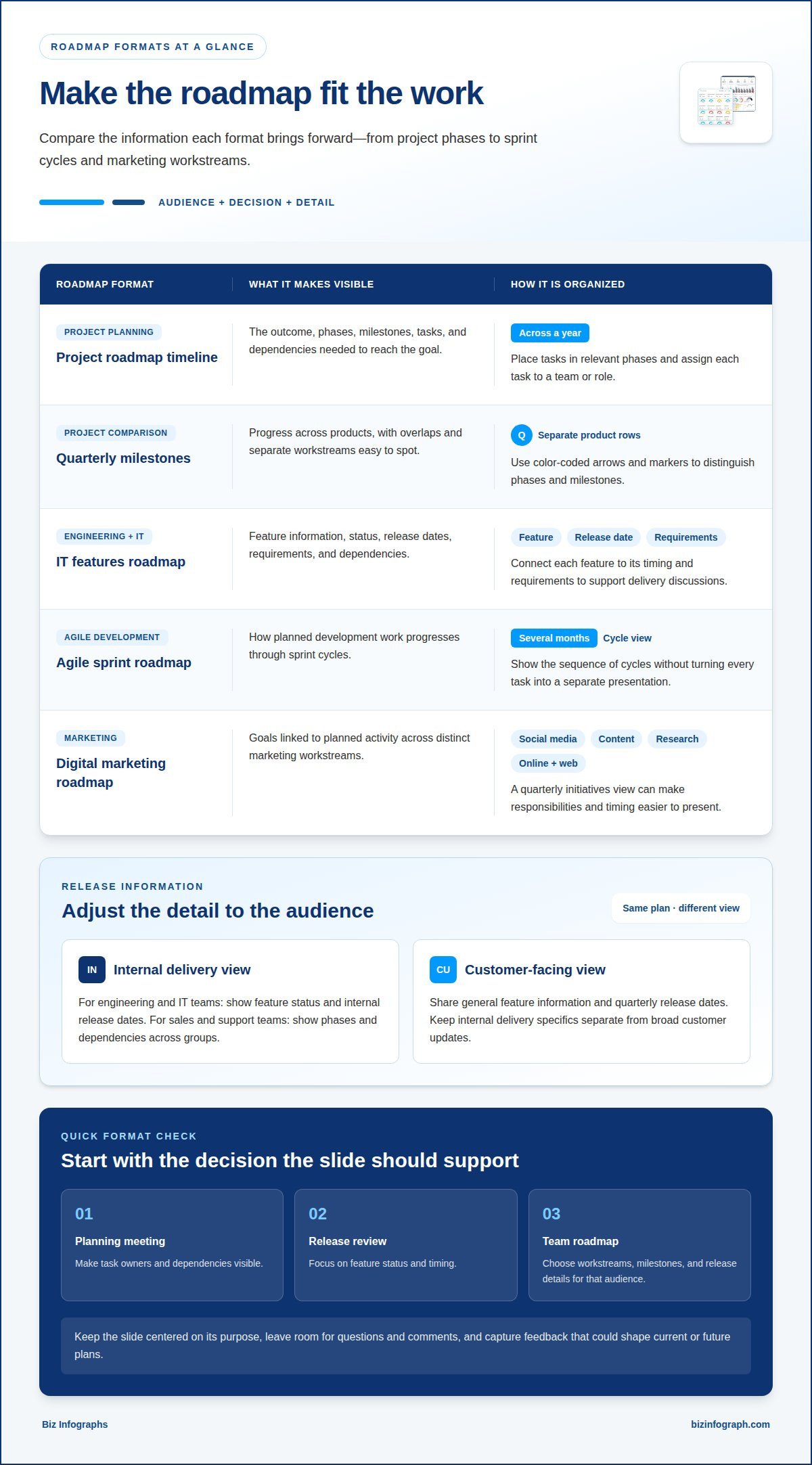
For project planning, define the outcome first, then map the phases and tasks needed to reach it. A project roadmap timeline template can lay out phases, milestones, and tasks across a year. Assign each task to a team or role and place it in the relevant phase. This connects day-to-day work to the larger goal and helps teams identify dependencies before they affect delivery.
Product release planning makes the timeline more useful by showing how work moves toward launch. Engineering and IT teams can use a features roadmap to track feature status and internal release dates. A customer-facing version can show general feature information and quarterly release dates. Sales and support teams can use a release roadmap to present phases and dependencies across groups. Match the detail to the audience, keeping internal delivery specifics separate from broad customer updates.
- Project roadmap timeline: Use it to align project phases, milestones, and tasks across a year.
- IT project roadmap: Organize activities, milestones, and departmental tasks across an annual timeline.
- Features or release roadmap: Communicate feature status, release timing, phases, and cross-team dependencies.
Choose a slide structure that supports the decision at hand. A planning meeting may need task owners and dependencies, while a release review needs feature status and timing. Leave room for questions and comments, then capture feedback that could shape current or future plans.
Executive and advisory board roadmap slides
Executives and advisory boards need a strategic view of product direction, not a task-by-task delivery log. Their roadmap presentation should connect high-level product themes with investment areas and release timelines across products. For example, a portfolio slide can show which themes support company goals, while a timeline shows when major releases are planned.
Build the slides around the decisions leaders need to make. Group work by product or strategic theme, show the investment area beside each group, then place planned releases on a shared timeline. This helps the board see how priorities relate, where efforts overlap, and which plans need discussion.
- Portfolio roadmap slide: Compare product themes and planned releases across the portfolio. Use product rows to make shared timing and gaps visible.
- Investment area slide: Connect strategic priorities to the product work supporting them. For example, group initiatives under customer experience or platform development.
- Release timeline slide: Show major release timing across products. Keep the view at a high level, so leaders can compare plans without operational detail.
Focus each slide on one executive-level question. A portfolio view shows what is planned across products. An investment view clarifies where strategic effort is directed. A release timeline makes timing easier to compare. Use consistent product names and visual markers so the board can follow the same themes throughout the presentation.
Mark executive and advisory board roadmap presentations confidential, and update them quarterly. Treat the deck as a snapshot: revise release timelines and investment themes when plans change, then make the update period clear on the slides. Keep detailed task lists outside the main presentation so they don’t distract from portfolio decisions. Reserve time for questions and comments, and capture feedback that could affect current or future plans.
Project, IT, sprint, and digital marketing roadmaps
Yes. Roadmap slides can be tailored to functions such as IT, Agile development, or marketing, with labels that reflect an industry’s priorities. Choose a format based on the workstreams, milestones, and release details that audience needs to see.
For project planning, a quarterly milestones roadmap gives each product its own row. Color-coded arrows and markers distinguish phases and milestones, making overlaps easier to spot. Use this format to compare progress across products without merging separate workstreams into one timeline.
- Quarterly milestones roadmap: Compare product phases and milestones using separate rows, arrows, and color-coded markers.
- IT features roadmap: Present feature information, release dates, and requirements for engineering and IT teams.
- Agile sprint roadmap: Map sprint cycles across several months to show how planned development work progresses.
- Digital marketing roadmap: Organize social media, content marketing, market research, online, and web strategies.
An Agile product sprint view helps teams see cycles across several months without turning every task into a separate presentation. For an IT roadmap, connect each feature to its release date and requirements. This makes the slide useful for discussing both planned delivery and its dependencies.
Marketing teams can use a quarterly initiatives roadmap to connect goals with planned activity. Separate workstreams for social media, content, research, online, and web strategies make responsibilities and timing easier to present. Keep the roadmap aligned with release status, mark marketing presentations confidential, and update the content as plans change.
Before downloading or building a slide, identify its audience and the decision it should support. A sprint review needs cycle visibility; an IT update needs feature and release details. Matching the template to that purpose helps the roadmap communicate the right level of information.
PowerPoint roadmap templates
Choose a template based on audience, planning horizon, and level of detail. A product roadmap PowerPoint template for quarterly milestones suits teams presenting near-term phases, while a five-year strategy layout supports longer-range planning. Match the visual structure to the decisions your team needs to make.
PowerPoint works well for presenting a visual plan; Google Slides can suit browser-based collaboration, while Excel supports spreadsheet-style planning and data organization. Choose the format your team can maintain and share effectively, then keep the roadmap’s goals, milestones, and timing consistent across versions.
The best paid template is the one that fits your roadmap’s purpose and gives you useful slide layouts. Compare the included timeline formats, editable elements, and audience fit. Prices vary by seller and license, so review those terms before buying; no specific price applies to every template.
- Quarterly timeline: Present key activities across a quarter.
- Six-month product roadmap: Display goals, initiatives, and timelines across six months.
- Five-year strategy roadmap: Map product strategies over five years.
- Release roadmap: Group each release into new features, fixes, and marketing activities.
- Now, Next, Later roadmap: Sort tasks and initiatives by timeframe.
To create a roadmap in PowerPoint, define the product goal, choose a planning horizon, group initiatives into phases, and place milestones on a timeline. Add owners and dates, then review the slide for clarity before presenting it.
For customization, label each milestone with its deliverable, assign an owner, and add the relevant date or period. Use consistent colors to distinguish phases or teams, and include a legend when color carries meaning. Keep labels brief so the timeline stays readable. Many roadmap templates are described as 100% editable, allowing teams to adapt slide elements to their plan.
Pick a layout that makes your team’s next decision clear, then adapt its labels and milestones. Explore PowerPoint infographic templates for visual roadmap slides.
Useful paid options include quarterly timeline, six-month product roadmap, five-year strategy, release, and Now, Next, Later templates; the best fit depends on your planning horizon and audience. Prices vary by seller and license, so compare those terms before buying.
Biz Infographs: PowerPoint Infographic Templates
Biz Infographs offers PowerPoint Infographic Templates that help turn roadmap information into clear, presentation-ready visuals. They’re a practical next step when your team has set its goals, milestones, and timeline and wants a polished way to communicate them.
Choose a visual format that suits the roadmap’s purpose, then organize the content around the decisions your audience needs to make. For related reporting, Excel Dashboard Templates and Power BI Templates support data visualization, while Automation Templates help with workflow tasks.
Explore the available template options to find a visual approach that fits your team’s presentation. If you’d like help choosing a suitable option, contact Biz Infographs.
Build your next roadmap around a decision
Give your next roadmap presentation a clear purpose: help its audience make a decision. Before opening PowerPoint, identify what leaders or teammates need to understand, discuss, or decide. This focus keeps the deck purposeful and makes every visual count.
As priorities evolve, revisit the story behind the roadmap. Keep what still supports the direction, revise what no longer fits, and make the next discussion easier to follow. A well-chosen product roadmap PowerPoint template gives you a starting point; your team’s judgment turns it into a useful communication tool.
If you’re ready to shape your roadmap into a polished team presentation, contact Biz Infographs for roadmap support. Start with the decision you’re helping your audience make, then build a clear story around it. Your next roadmap presentation can help your team move forward with confidence.
Frequently Asked Questions
What is a product roadmap PowerPoint template?
A product roadmap PowerPoint template is a reusable slide layout for presenting product direction and planned work. It turns priorities into a visual story, with sections for goals, initiatives, timing, and progress. For example, a team can map a new feature’s journey from planning through launch, then tailor the slides for executives, developers, or customers.
Where can I download free roadmap templates for PowerPoint?
Free roadmap infographic downloads are available in template collections for PowerPoint and Google Slides. Choose a format that suits your presentation needs, then review the included slide layouts before building your plan. A simple timeline can work for a short team update, while a product roadmap PowerPoint template with several slide styles can help teams present different views to different audiences.
What are the best product roadmap templates for quarterly planning, releases, and timelines?
The best format depends on the planning decision: use a quarterly layout to coordinate initiatives, a release view to communicate launch-related work, or a timeline to compare milestones across products. For example, a team presenting quarterly priorities can pair goals with major activities, while a release-focused deck can group work by feature, fix, and marketing activity.
What are the best paid product roadmap PowerPoint templates and prices?
Choose a paid template that fits your roadmap’s purpose and audience, with useful timeline formats and editable elements. Prices vary by seller and license, so review those terms before buying.
What are common product roadmap presentation mistakes and risks?
Common risks include giving executives too much task-level detail, choosing a format with the wrong level of detail for the audience, and leaving goals, owners, dependencies, or timelines unclear. Outdated plans and inappropriate sharing can also create problems. Manage access and update the roadmap when plans change.