

A real estate investment analysis in Excel should connect a property’s income and operating expenses with purchase financing, capital costs, leasing expenses, and cash flow. Start with a pro forma, a structured projection showing how these inputs affect net operating income and investment returns. The goal is to understand what drives profitability, not simply to produce a polished spreadsheet.
It’s easy to focus on rent and purchase price while overlooking costs and assumptions that can change the outcome. A clear model brings these elements together so you can assess a deal with greater confidence. Organize your assumptions, calculate financing and property expenses, and evaluate measures such as yield on cost and cash flow. Then test scenarios to see how changes in rent or occupancy affect the results.
Key Takeaways
- Build a cash-flow model that connects property income, operating expenses, financing, and returns in one clear view.
- Separate capital improvements, tenant work, and leasing commissions so you can see how each cost affects investment performance.
- Test purchase and loan assumptions, then compare measures such as IRR, MoIC, and cash-on-cash yield to understand different aspects of returns.
- Run scenarios for rent, occupancy, and expenses to identify which assumptions have the greatest effect on profitability.
What is a Real Estate Investment Model?
Build a cash-flow model that links property income, costs, financing, and investor returns. When choosing a free Excel template, look for editable inputs, visible assumptions, linked formulas, and scenario options.
-
Build the Development Budget and Cash Flow
List development costs, lease income, operating expenses, and debt service in separate rows, then forecast when each cash flow occurs. A real estate model connects these supporting schedules to the property’s overall cash flow. Excel works well for transparent, editable assumptions; real estate software can support larger workflows, but the underlying inputs still drive the analysis.
-
Forecast Returns and After-Tax Cash Flow
Project operating income and expenses across the investment period, then subtract debt service to show cash available to equity. Add tax assumptions as separate inputs to compare pre-tax and after-tax cash flows without blending them. For a development budget, map costs and income to their expected timing; a 2015 duplex purchase example can illustrate how acquisition and leasing periods affect the forecast.
-
Calculate Investment Return Metrics
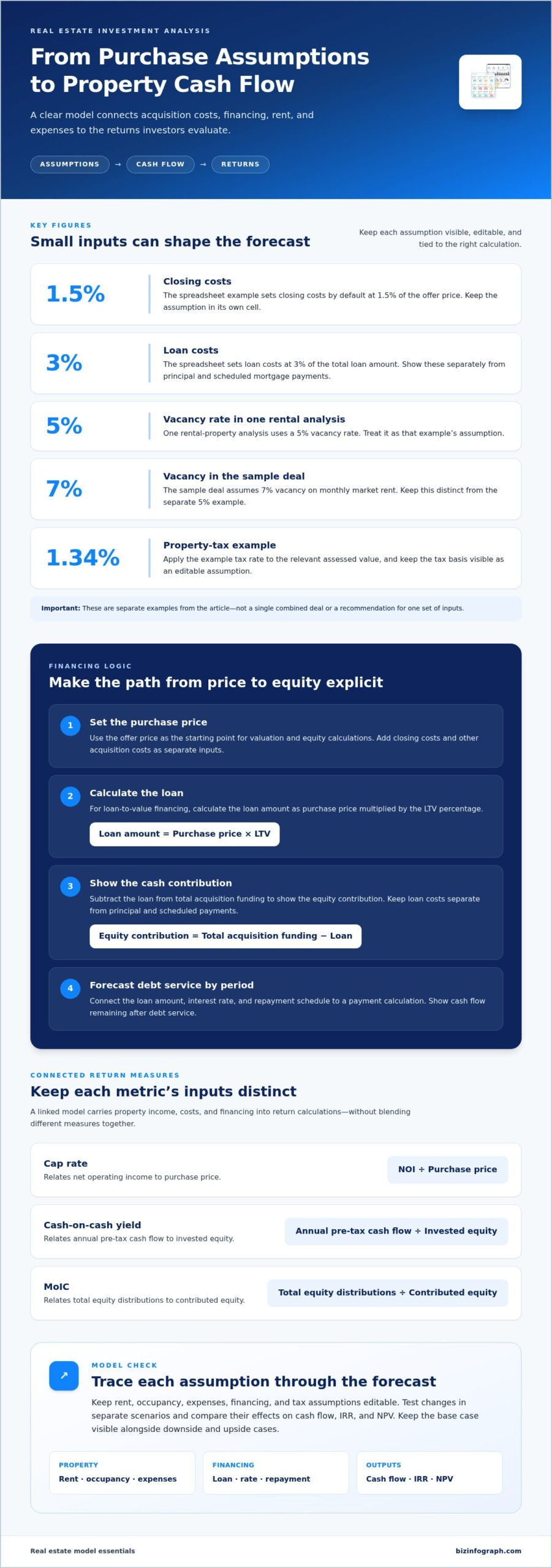
Calculate cap rate by dividing net operating income by purchase price, and cash-on-cash yield by dividing annual pre-tax cash flow by invested equity. Spreadsheet analysis and financial planning resources like MoneyTols can help evaluate returns from projected cash flows. Calculate MoIC by dividing total equity distributions by contributed equity, keeping each metric’s inputs distinct.
-
Model Investment Risks and Sensitivity
Use Excel data tables or separate scenario columns to vary rent, occupancy, operating costs, and financing assumptions. Compare the effect on cash flow, IRR, and NPV, then identify which inputs move returns most. Keep the base case visible alongside downside and upside cases, and link formulas directly to assumptions so changes flow through the model.
Capital expenditures, tenant improvements, and leasing commissions
Separate recurring operating expenses from property improvements and leasing costs. This keeps property-level forecasts clear and shows how each assumption affects net operating income.
- Separate operating costs from capital costs. Record recurring expenses, such as maintenance and utilities, apart from capital expenditures for major improvements. This distinction helps show which costs reduce current operating income and which support the property over time. Keep both categories visible in the template rather than combining them in one expense line.
- Forecast property income and operating expenses. Build revenue from lease terms, expected occupancy, and rent changes, then list expenses by category. Calculate net operating income by subtracting operating expenses from rental revenues. Keep assumptions editable so a change in lease income or expense estimates flows through to the forecast.
- Model tenant improvements and leasing commissions separately. Enter tenant improvements when they are expected to be paid, and show leasing commissions as costs associated with securing or renewing leases. Timing matters: these costs can reduce cash available even when the property’s operating income remains unchanged. Avoid treating either item as recurring operating expense.
- Add reserves and property tax assumptions. Include reserves for future repairs separately from current operating expenses, so planned maintenance does not disappear from the cash-flow view. For the property-tax example, use a 1.34% tax rate and apply it to the relevant assessed value. Show the calculation as an assumption that can be updated as the tax basis changes.
- Review the expense bridge. Compare rental income with operating expenses, property taxes, reserves, tenant improvements, and leasing commissions. Check that each cost appears once and in the correct period. A clear Excel dashboard template can help present these categories and highlight how operating assumptions shape net operating income.
Property purchase price and financing assumptions
Set purchase, financing, rent, and vacancy inputs separately. This makes each assumption easy to adjust and trace through an apartment investment forecast.
- Enter the offer price and acquisition costs. Use the purchase price as the starting point for valuation and equity calculations. The spreadsheet example sets closing costs by default at 1.5% of the offer price, so keep that assumption in its own cell. Add other purchase costs as separate inputs rather than folding them into the price.
- Calculate the loan and cash contribution. For loan-to-value financing, calculate the loan amount as purchase price multiplied by the LTV percentage. Subtract the loan from total acquisition funding to show the equity contribution. The spreadsheet sets loan costs at 3% of the total loan amount, which should appear separately from principal and scheduled mortgage payments.
- Model debt service from loan terms. Connect the loan amount, interest rate, and repayment schedule to a payment calculation. Forecast debt service by period, then show the remaining cash flow after payments. Keep financing assumptions editable, since changing loan terms affects both the equity required at purchase and cash available during ownership.
- Forecast rental income and vacancy. Build rental revenue from lease assumptions, including market rent, lease timing, and occupancy. One rental-property analysis uses a 5% vacancy rate, while the sample deal assumes 7% vacancy on monthly market rent. Keep these as distinct examples, not combined inputs, and model credit loss separately if your assumptions include unpaid rent.
- Test the expense assumptions. List operating expenses alongside rent so the forecast shows how costs affect property cash flow. If you download a spreadsheet, review its vacancy, rent, and expense inputs before relying on its outputs. Change one assumption at a time, then compare the effect on equity needs, debt service, and projected returns.
Real estate investment profitability analysis
Measure profitability through operating income, acquisition costs, debt payments, and investor cash flow. To compare rental property scenarios in Excel, keep the model structure constant and change assumptions such as rent, occupancy, or expenses.
-
Assess Investment Profitability
Start with annual income and net operating income, then compare them with total project costs. A real estate pro forma example calculates annual base rental income of $500,000 for a 10,000-rentable-square-foot property at $50 per square foot per year. Calculate yield on cost as net operating income divided by total cost basis, and compare it with the sample target cap rate on cost of 7%.
For property taxes, a 100% reassessment estimate is a conservative assumption when a property sells above assessed value. In the example, a $240,000 price, 100% reassessment percentage, and 1.34% tax rate produce future annual taxes payable of $3,223.
-
Compare Rental Property Scenarios in Excel
Create a base case, then vary one assumption at a time to see its effect on monthly cash flow and annual performance. This comparison shows how rent assumptions can change the result after debt payments.
Use separate inputs for unit count, rent increases, and occupancy rates. Detailed models can project monthly cash flows based on the timing of rent, operating expenses, and debt service. For a multifamily property, compare scenarios using the same acquisition and financing assumptions, then assess which rent or occupancy changes most affect the cash available to investors.
Build a clear investment scenario dashboard to make the comparisons easier to scan and present.
The template lets users adjust unit counts, rent increases, and occupancy rates for scenario modeling. Use these inputs to define alternatives and see how unit count, rent growth, and occupancy assumptions shape each scenario.
Biz Infographs: PowerPoint Infographic Templates
Biz Infographs helps turn investment analysis into clear, presentation-ready visuals with PowerPoint Infographic Templates and Excel Dashboard Templates. Once your model connects rental income, expenses, financing, and returns, an Excel dashboard can make key measures easier to review side by side. Use it to highlight scenario differences, track assumptions, and present results without obscuring the calculations behind them.
For example, organize cash flow, net operating income, and return measures in a dashboard, then use a PowerPoint infographic to communicate the main findings to stakeholders. These templates support clear reporting, while the property assumptions and formulas remain yours to build and evaluate.
Explore Biz Infographs’ templates at bizinfograph.com.
Turn Your Analysis Into a Clear Next Step
A disciplined approach to real estate investment analysis in Excel can support stronger decisions, but its value also depends on how clearly you communicate your findings. Consider who needs to understand the analysis and what decision they need to make. A focused presentation can highlight the assumptions and comparisons that matter while keeping the underlying model in view.
Biz Infographs offers PowerPoint Infographic Templates, Excel Dashboard Templates, and Power BI Templates to help turn data into clear visual communication. Choose a format that fits how you plan to review or present your work, and keep your key messages connected to the analysis behind them.
Ready to create a more polished way to share your insights? Contact Biz Infographs and take the next step with confidence.
Frequently Asked Questions
Simplification 101: Why the Real Estate Pro-Forma?
A real estate pro forma turns property assumptions into a structured financial projection. It shows how lease income, operating costs, financing, and sale proceeds connect, rather than treating each figure in isolation. Use the same layout for every property under consideration, then adjust the assumptions that differ. This makes it easier to identify what drives projected cash flow and compare opportunities consistently.
What should a real estate investment analysis Excel spreadsheet include?
Include an assumptions area, an acquisition schedule, revenue and expense forecasts, financing calculations, and return measures. Add lease details such as rent, start dates, and renewal assumptions, along with separate lines for vacancy, capital work, and reserves. A clearly labeled output area can show projected cash flow and investor returns. Keep input cells distinct from formulas so you can update assumptions without overwriting calculations.
What expenses and vacancy assumptions should a rental property analysis include?
List property taxes, insurance, maintenance, utilities, and management costs based on the property’s operating plan. Track capital improvements and reserves separately from routine expenses. Model vacancy and credit loss as separate reductions from potential rental income: vacancy reflects unoccupied space, while credit loss represents rent that is not collected. Tie assumptions to lease terms and expected occupancy, then test their effect on projected cash flow.
Best free real estate investment analysis Excel templates
Choose an editable Excel template with visible assumptions, linked formulas, and scenario inputs. It should connect property income, expenses, financing, cash flow, and returns.
How to analyze real estate investments with Excel versus real estate software
Excel is useful for transparent, editable assumptions, while real estate software can support larger workflows. Either way, the underlying inputs drive the analysis.
How to calculate mortgage payments and debt service coverage ratio in Excel
Link the loan amount, interest rate, and repayment schedule to a payment calculation, then forecast debt service by period. The model describes debt service but does not calculate the debt service coverage ratio.